
Last Verified: June 2026 | By SimOwner.net.pk Editorial Team — Pakistan’s SIM registration specialists since 2015
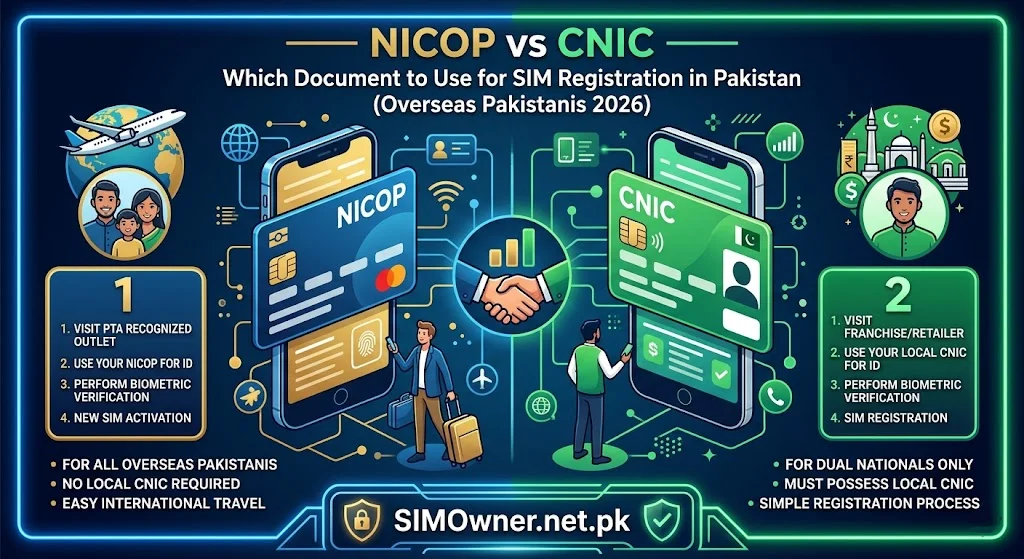
For the 9+ million Pakistanis living abroad, one of the most common telecom questions is: when visiting Pakistan or managing a Pakistani SIM from abroad, should I use my NICOP (National Identity Card for Overseas Pakistanis) or my CNIC (Computerized National Identity Card) for SIM registration?
The short answer is that both documents can be used, but with important differences in how they work, what information they carry, and what the implications are for SIM verification. The choice affects how your SIMs appear in 668 checks, what the 8-SIM limit looks like for you, and how you can manage your Pakistani SIMs when you are not physically in the country.
This guide provides the complete comparison — what NICOP and CNIC are, which Pakistani networks accept which document, what the registration process looks like for each, and the practical recommendations for overseas Pakistanis managing their Pakistani mobile identity. Verify your current SIM registration picture at SimOwner.net.pk before making any registration decisions.
What Is NICOP?
NICOP (National Identity Card for Overseas Pakistanis) is NADRA’s identity document specifically designed for Pakistani nationals residing abroad. It is the overseas equivalent of the domestic CNIC and serves as the primary identity document for overseas Pakistanis in both Pakistan and their country of residence for Pakistan-related matters.
NICOP Key Characteristics
Same 13-digit number format: NICOP uses the same 13-digit Pakistani identity number as a domestic CNIC. The number structure is identical — starting with the district code, followed by the serial number, and ending with the gender digit.
Green card appearance: NICOP cards are traditionally green (versus the blue of domestic CNIC), though both are Smart Card format in current issuances.
Biometric data: NICOP contains the same biometric data (fingerprints, photograph) as a domestic CNIC — enrolled through NADRA Registration Centres or Pakistani Embassies/Consulates abroad.
Dual status: NICOP holders can have both a NICOP and a domestic CNIC — these have the same 13-digit number in most cases (for citizens who obtained their CNIC before emigrating and then renewed as NICOP).
Who Gets NICOP?
Pakistani nationals who hold foreign residency, permanent residency, or citizenship while maintaining Pakistani nationality. The key distinction: NICOP holders are Pakistani nationals living permanently or long-term abroad.
What Is POC (Pakistan Origin Card)?
Before detailing NICOP vs CNIC for SIM registration, a brief clarification on POC — because many overseas Pakistanis confuse NICOP and POC:
POC (Pakistan Origin Card): Issued to persons of Pakistani origin who hold foreign citizenship (e.g., a British Pakistani who has given up Pakistani nationality). POC is NOT the same as NICOP. POC holders are foreign nationals with Pakistani origin — they are not Pakistani nationals.
SIM registration implications for POC: POC holders register SIMs as foreign nationals — using their foreign passport as the primary document, not the POC. SIM registration limits for POC holders follow the foreign national framework (lower limits, tourist/resident visitor procedures).
This guide focuses on NICOP — for Pakistani nationals abroad who are citizens of Pakistan.
NICOP and the PTA SIM Registration Framework
PTA’s subscriber registration regulations recognize NICOP as a valid identity document for SIM registration. This means overseas Pakistanis with valid NICOP can register Pakistani SIMs using their NICOP — subject to the same biometric verification requirements as domestic CNIC holders.
How NICOP Registration Works
Biometric verification: The NADRA MBVS (Multi-Biometric Verification System) contains biometric data for NICOP holders — the same fingerprint templates and photographs enrolled during NICOP issuance. MBVS verification at a Pakistani franchise works identically for NICOP and domestic CNIC.
8-SIM limit: The 8-SIM-per-identity limit applies to NICOP holders as it does to CNIC holders. NICOP SIMs and CNIC SIMs registered on the same underlying identity number count toward the same limit.
Network coverage: All five Pakistani networks (Jazz, Zong, Telenor, Ufone, SCO) accept NICOP for SIM registration.
NICOP vs CNIC — Direct Comparison for SIM Registration
| Factor | CNIC | NICOP |
|---|---|---|
| Valid for SIM registration | ✅ Yes | ✅ Yes |
| Biometric verification supported | ✅ Full | ✅ Full |
| 8-SIM limit applies | ✅ Yes | ✅ Yes |
| 668 check works | ✅ Yes | ✅ Yes |
| NADRA MBVS integration | ✅ Complete | ✅ Complete |
| All networks accept | ✅ Yes | ✅ Yes |
| Can register remotely (without visiting Pakistan) | ❌ No | ❌ No (same — biometric required) |
| Accepted at all franchise locations | ✅ Yes | ⚠️ Most — some small agents less familiar |
| Embassy attestation available for documents | Not applicable | ✅ Yes |
The practical difference is minimal for in-person SIM registration. Both documents work equally well at official network service centers. The only operational difference is that some very small third-party franchise agents may be less familiar with NICOP documents and may need supervisor assistance — which is one more reason to use official service centers (Jazz Experience Centers, Telenor SSCs, Zong CSCs) rather than small franchise dealers for SIM registration.
Checking NICOP-Registered SIMs via 668
The 668 service works with NICOP numbers in exactly the same way as CNIC numbers — because the underlying 13-digit number is the same format.
How to Check Your NICOP SIMs
Send your 13-digit NICOP number (without dashes) to 668 from any Pakistani mobile.
The response shows: All SIMs registered on that 13-digit number — whether registered using the NICOP card or a domestic CNIC card with the same number.
Important nuance: If your NICOP and domestic CNIC have the same 13-digit number (which is the case for Pakistanis who emigrated after obtaining a CNIC), then checking either number via 668 gives the same result — showing all SIMs regardless of which physical card was used during registration.
For NICOP-specific SIM status monitoring, use the SIM information tools at SimOwner.net.pk which guide you through verification regardless of whether you are checking via NICOP or CNIC number.
Which Document Should Overseas Pakistanis Use? — Practical Recommendation
Scenario 1 — You Have Both NICOP and a Valid Domestic CNIC
If you have both documents and both are valid:
Use the domestic CNIC for SIM registration in Pakistan.
- More familiar to franchise staff — reduces processing friction
- CNIC is the standard reference document in PTA’s SVMS
- If any SVMS discrepancy arises, CNIC resolution is typically faster
- Banks and other services in Pakistan primarily use CNIC
Use NICOP when: Domestic CNIC is expired and you have not renewed it yet, or when you are at an overseas location (Embassy/Consulate) registering a SIM through a remote process.
Scenario 2 — You Only Have NICOP (No Active Domestic CNIC)
If you emigrated and converted to NICOP without maintaining a domestic CNIC:
Use NICOP for all Pakistani SIM registrations.
- This is the correct document for your situation
- All networks accept it
- NADRA MBVS works fully with NICOP biometrics
- Visit official network service centers — not small franchise agents
Scenario 3 — Your NICOP Is Expired
An expired NICOP is typically not accepted for new SIM registration (same as expired CNIC). Renew your NICOP at the nearest Pakistani Embassy/Consulate before attempting SIM registration.
Scenario 4 — You Are Visiting Pakistan Temporarily (Short-Term Visit)
For a temporary visit where you want a local SIM for the duration:
Options:
- Register a SIM using your NICOP (permanent registration on your identity — same limit rules apply)
- Register a tourist SIM as a foreign national if you hold foreign citizenship — though this may be less convenient and has lower SIM limits
For most overseas Pakistanis on temporary visits, using NICOP for a regular SIM registration gives better service (standard Pakistani rates, full features) than tourist SIM options.
Remote SIM Management for NICOP Holders
One of the most important SIM security concerns for overseas Pakistanis is managing Pakistani SIMs when they are not physically in the country. Key considerations:
Monitoring Your NICOP-Registered SIMs From Abroad
The 668 check works from anywhere in Pakistan with a Pakistani SIM. For monitoring from abroad:
Option 1 — Family member monitoring: Have a trusted family member in Pakistan send your NICOP/CNIC number to 668 monthly and share the screenshot with you. This provides real-time monitoring without requiring your presence.
Option 2 — cnic.sims.pk: This web portal is accessible from anywhere in the world with internet. Enter your NICOP/CNIC number for instant SIM registration status.
Option 3 — SimOwner.net.pk: The CNIC information tools at SimOwner.net.pk provide guidance on monitoring your Pakistani identity’s SIM registrations from abroad.
Fraud Risk for Inactive NICOP-Registered SIMs
NICOP-registered SIMs that become inactive (not used for 180+ days because you are abroad) face the same fraud risk as any inactive Pakistani SIM — criminals specifically target inactive numbers because the legitimate owner clearly does not monitor them.
Prevention: Monthly 668 checks by a family member in Pakistan, and periodic SIM activation (have a family member briefly use the SIM once every 4–5 months if you cannot).
NICOP Renewal — Keeping Your Pakistani Identity Current
An expired NICOP creates complications for SIM registration and management. NICOP renewal:
Where to renew: Pakistani Embassy or Consulate in your country of residence, or online through NADRA’s Pak Identity portal (id.nadra.gov.pk) for some countries.
Processing time: Typically 4–8 weeks for standard processing, faster for urgent processing with additional fee.
Fee: Varies by country of application — check with your nearest Pakistani Embassy.
Why renewal matters for SIM security: An expired NICOP means your biometric data in NADRA’s MBVS may not reflect your current fingerprints (if not updated during renewal). Keeping NICOP current keeps MBVS data current — ensuring legitimate biometric verification succeeds when you visit Pakistan and need SIM services.
NICOP and the 8-SIM Limit — Counting Your SIMs
A common question from overseas Pakistanis: do SIMs registered during visits to Pakistan count toward the same limit as SIMs they may have registered before emigrating?
Answer: Yes. All SIMs registered on your 13-digit Pakistani identity number — whether using NICOP or domestic CNIC, whether registered 10 years ago or last week — count toward the same 8-SIM total.
Practical implication: If you have 6 SIMs from before emigration still active on your CNIC, you can register at most 2 more using your NICOP. The total across all networks and registration periods cannot exceed 8.
Check your current count: Send your NICOP/CNIC number to 668 for an instant count. If you are approaching 8 — deactivate unused SIMs before registering new ones.
Frequently Asked Questions
Q: My NICOP has a different 13-digit number than my old CNIC. Which should I use?
A: This is unusual — NICOP and CNIC for the same person should have the same 13-digit number. If your numbers differ, contact NADRA to resolve the discrepancy. Using both creates a split SIM registration history that complicates fraud investigation and service requests.
Q: Can I transfer a SIM from my CNIC to my NICOP?
A: Since NICOP and CNIC typically have the same underlying 13-digit number — there is no “transfer” to do. The SIM is already registered on that number regardless of which card was presented. If your NICOP and CNIC have different numbers (unusual) — SIM ownership transfer requires visiting a network service center with both documents.
Q: My NICOP expired while I was abroad and I could not renew it. Can I still manage my Pakistani SIMs?
A: Your existing SIMs remain active on PTA’s SVMS regardless of NICOP expiry — the registration is already done. For new SIM registrations or account changes requiring document verification, an expired NICOP creates obstacles. Renew your NICOP as soon as possible through the nearest Pakistani Embassy.
Q: If I use NICOP for SIM registration, will the SIM appear under my CNIC in 668?
A: If your NICOP and domestic CNIC have the same 13-digit number — yes, the SIM appears regardless of which card you send as the CNIC to 668. The 668 service queries by 13-digit number, not by which physical card was used during registration.
Q: Can I register a SIM at a Pakistani Embassy abroad using my NICOP?
A: Pakistani Embassies do not provide SIM registration services — SIM registration requires visiting a Pakistani network operator’s service center in Pakistan. For overseas SIM management, the Power of Attorney approach (designating a family member in Pakistan) is the recommended option.
Q: Is NICOP accepted at all Pakistani network franchise locations or only main service centers?
A: NICOP is legally accepted at all PTA-authorized SIM registration points. However, small third-party franchise agents may be less experienced with NICOP processing. For reliable service and complete verification, use official service centers (Jazz Experience Centers, Telenor SSCs, Zong CSCs, Ufone Sales Centers).
Summary: NICOP vs CNIC for SIM Registration
| Question | Answer |
|---|---|
| Can I use NICOP for SIM registration? | Yes — all networks accept it |
| Same biometric verification? | Yes — NADRA MBVS works for NICOP |
| Same 8-SIM limit? | Yes — same total across NICOP and CNIC registrations |
| Does 668 work with NICOP number? | Yes — same 13-digit format |
| Which should I use if I have both? | Domestic CNIC preferred for convenience |
| Can I register SIMs from abroad? | No — biometric verification requires physical presence |
| Expired NICOP accepted? | No — renew before SIM registration |
For Pakistan’s most comprehensive SIM verification, CNIC and NICOP protection tools, and overseas Pakistani security resources, visit SimOwner Details — Pakistan’s trusted SIM information resource since 2015.
All PTA regulatory references and NADRA NICOP information verified as of June 2026. SimOwner.net.pk is not affiliated with PTA, NADRA, or any network operator.
Related Guides on SimOwner.net.pk:
- Power of Attorney for SIM Management — Overseas Pakistanis
- SIM 180-Day Inactivity Rule — Keeping Your SIM Active
- How to Put a Fraud Flag on Your CNIC at NADRA Pakistan
- How to Check SIM Information With CNIC Number in Pakistan — All Official Methods
- How Many SIMs Can Be on One CNIC in Pakistan — Official Limit, Rules, and Free Check Guide (2026)